
If you’re using the ATEM Mini Extreme ISO G2 (firmware 10.2), you may have stumbled upon an annoying problem: as soon as you set the working frequency to a value lower than 50p (e.g. 25p or 24p), your monitor often remains black. This ATEM Mini Extreme G2 frequency bug causes the signal to be present according to the analyzer, but your screen does not show an image.
We have gone into technical analysis and have a clear opinion on it.
The Problem: The EDID Handshake Fails
The technical cause lies in the communication via EDID.
What is EDID? EDID (Extended Display Identification Data) is your monitor’s digital ID card. He tells the ATEM as he plugs it in, “Hey, I’m Model XY and I can handle the following resolutions and frequencies.”
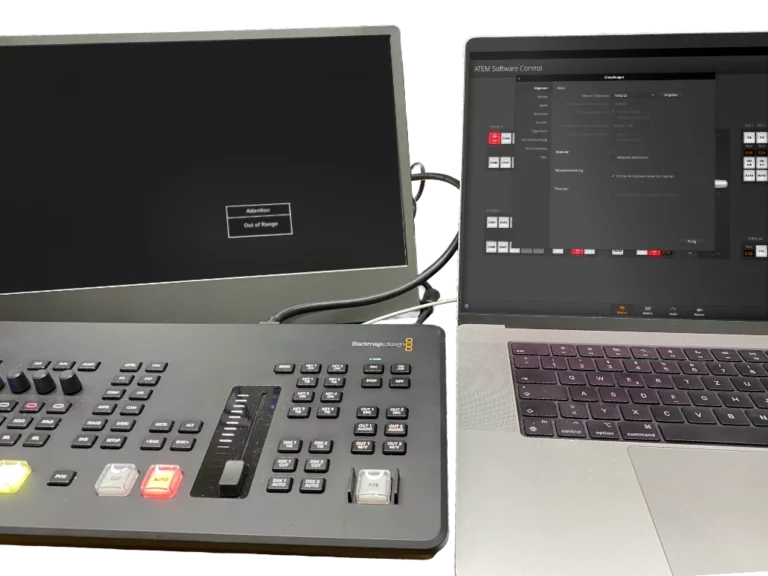
Blackmagic Design’s support suspects an “EDID clash”. The theory: The ATEM tries to update its internal table of supported formats while connected to the monitor. A conflict arises if a frequency lower than the usual 50 Hz or 60 Hz is selected.
The important thing about it: This problem occurs with most conventional monitors (standard PC screens, TVs). Only dedicated (and usually expensive) field monitors are often not affected. Why? These professional devices have internal converters that automatically adjust the incoming frame rate to the standard that the display needs internally for display. Conventional monitors are much more inflexible and simply drop out.
Our assessment: This is a bug!
Even though support sees the behavior of the monitors as the cause here, we stick to it: This EDID synchronization in the ATEM has errors. All previous Blackmagic Design switchers with HDMI outputs have worked smoothly. There is no conclusive reason why a traditional monitor should suddenly stop communicating with the mixer just because the frequency is lower. Therefore, we have filed a bug report to have this ATEM Mini Extreme G2 frequency bug fixed as soon as possible.
Your workaround: How to get a picture anyway
Until Blackmagic Design fixes up, there’s a simple trick to get around the problem. You need to force the handshake at a stable frequency:
Always start with at least 50p: First, set your ATEM to 1080p50 in the settings. Almost every monitor detects this signal immediately.
Switch on the fly: When the image is there, change the frequency to your target value (e.g. 1080p25) in the ATEM Software Control.
Do not turn off: As long as the ATEM is running, the monitor usually “holds” the connection, even if it doesn’t actually like the frequency.
Before the end of the day: Before you turn off the system, reset the frequency back to 50p and save this state (Save Startup State). So you are guaranteed to have a picture again the next time you start.
Conclusion
If your setup stays black at 25p, it’s not your monitor or cable. It is a bug in the startup process of the ATEM G2 at all frequencies below 50p. If you don’t use expensive field monitors with internal converters, our 50p workaround is currently the only solution to be able to work stably.
Feel free to let us know if this tip has helped you – the more feedback we collect, the clearer we can address the problem at Blackmagic!


